
General Accounting Transactions
Chinese source: 一般账务处理
Locale: en-US
Audience: Internal learning
Key Terms
| Chinese | English | Usage Note |
|---|---|---|
| 一般账务处理 | General Accounting Transactions | Basic posting and correction capabilities. |
| 通用转账 | General Transfer | A debit-side-to-credit-side accounting transfer. |
| 通用冲账 | General Transaction Reversal | A controlled reversal based on the original business reference. |
| 借方账号 | Debit Account | The source/funding side in the operations learning view. |
| 贷方账号 | Credit Account | The destination/receiving side in the operations learning view. |
| 原业务流水 | Original Business Reference Number | The key used to locate the transaction being reversed. |
Business Frame
General accounting transactions answer two operational questions:
| Question | Capability | Page |
|---|---|---|
| How do we move funds from one account to another? | Initiate a transfer by debit account, credit account, currency, and amount. | [1001] General Transfer |
| How do we correct or undo a previous transaction? | Retrieve the original transaction by business reference and submit a controlled reversal. | [1002] General Transaction Reversal |
These pages are foundational in a deposit core. Fees, account closure, withdrawals, suspense clearing, and exception handling may all relate back to posting and reversal logic.
flowchart LR
  A["1001 General Transfer<br/>Debit side funds out"] --> B["Credit side funds in"]
  B --> C["Transaction record is created"]
  C --> D{"Error or cancellation needed?"}
  D -->|No| E["Transaction complete"]
  D -->|Yes| F["1002 Reversal<br/>Locate original business reference"]
  F --> G["Reversal record and audit trail are created"]
[1001] General Transfer
Screenshot
Page Purpose
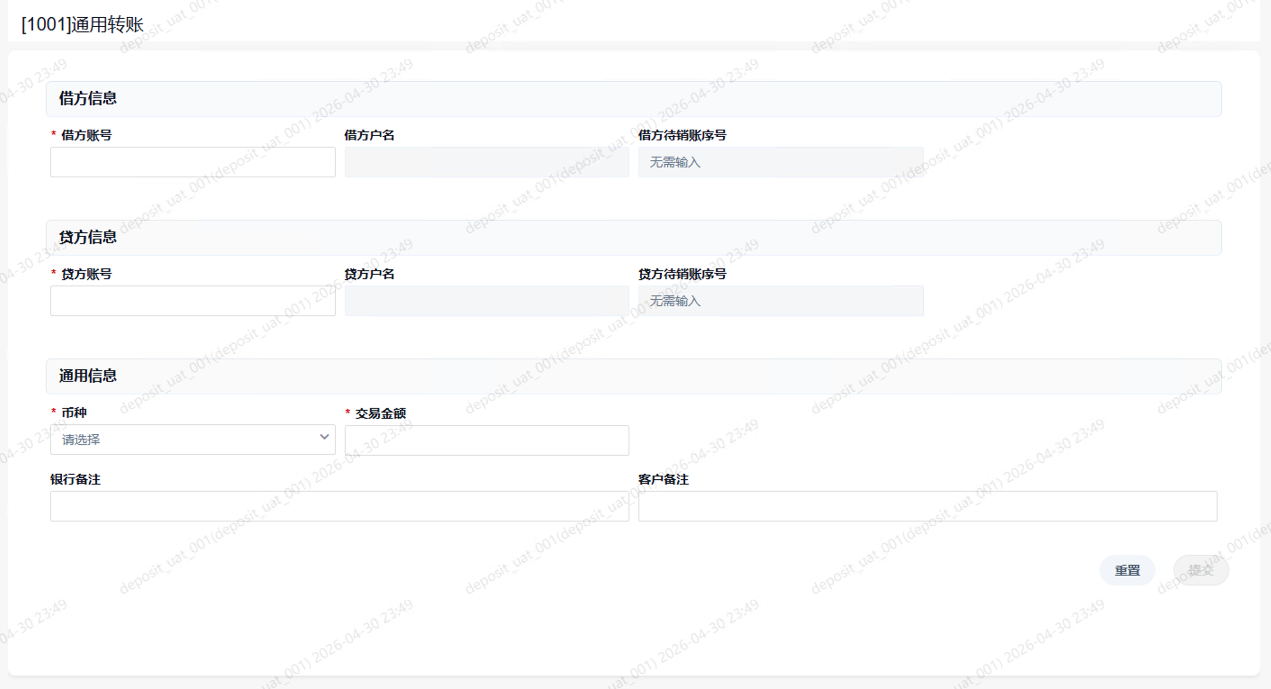
General Transfer initiates a basic funds movement between a debit account and a credit account. The page is about four core facts: where the funds come from, where they go, which currency applies, and how much is posted.
The screenshot shows three sections: debit information, credit information, and common information. Debit account, credit account, currency, and transaction amount are required fields. Account names and suspense account fields are typically populated or handled by the system.
Page Elements
Debit Information
| Field | Required | Description |
|---|---|---|
| Debit account | Yes | Account where funds are taken from. |
| Debit account name | Display | Name returned by the system for the debit account. |
| Debit suspense account | System-handled | The screenshot indicates no manual input is needed. |
Credit Information
| Field | Required | Description |
|---|---|---|
| Credit account | Yes | Account where funds are posted to. |
| Credit account name | Display | Name returned by the system for the credit account. |
| Credit suspense account | System-handled | The screenshot indicates no manual input is needed. |
Common Information
| Field | Required | Description |
|---|---|---|
| Currency | Yes | Currency for this transfer. |
| Transaction amount | Yes | Amount to be posted. |
| Bank memo | No | Internal memo for operations and audit. |
| Customer memo | No | Customer-facing or customer-explainable memo, depending on system rules. |
Business Flow
- The operations user opens
[1001] General Transfer. - The user enters the debit account, and the system returns the debit account name.
- The user enters the credit account, and the system returns the credit account name.
- The user selects currency and enters the transaction amount.
- The user enters bank and customer memos if needed.
- The user submits the transaction.
- The system validates account status, available balance, currency, limits, restriction codes, user permissions, and approval rules.
- If validation passes, the system debits the source account, credits the destination account, and records the transaction.
Core Reading
The core idea is simple: debit side out, credit side in. Do not focus only on the amount. Always read the debit account, credit account, account names, currency, and memo together.
The word general does not mean unrestricted. This page can directly change customer or internal account balances, so its usable scope is usually controlled by transaction rules, account types, currency rules, limits, restrictions, and authorization.
Risk Controls
| Risk | Control Point |
|---|---|
| Wrong account number or account name | Confirm debit and credit account identity before submission. |
| Wrong amount | Validate amount carefully because posting changes balances directly. |
| Ignored restrictions | Check account status, freezes, stop-pay controls, restriction codes, and limits. |
| Misuse of a general transfer | Use dedicated transactions when a business scenario has a specialized flow. |
| Weak audit trail | Ensure transaction references, user records, and memos support later review. |
[1002] General Transaction Reversal
Screenshot
Page Purpose
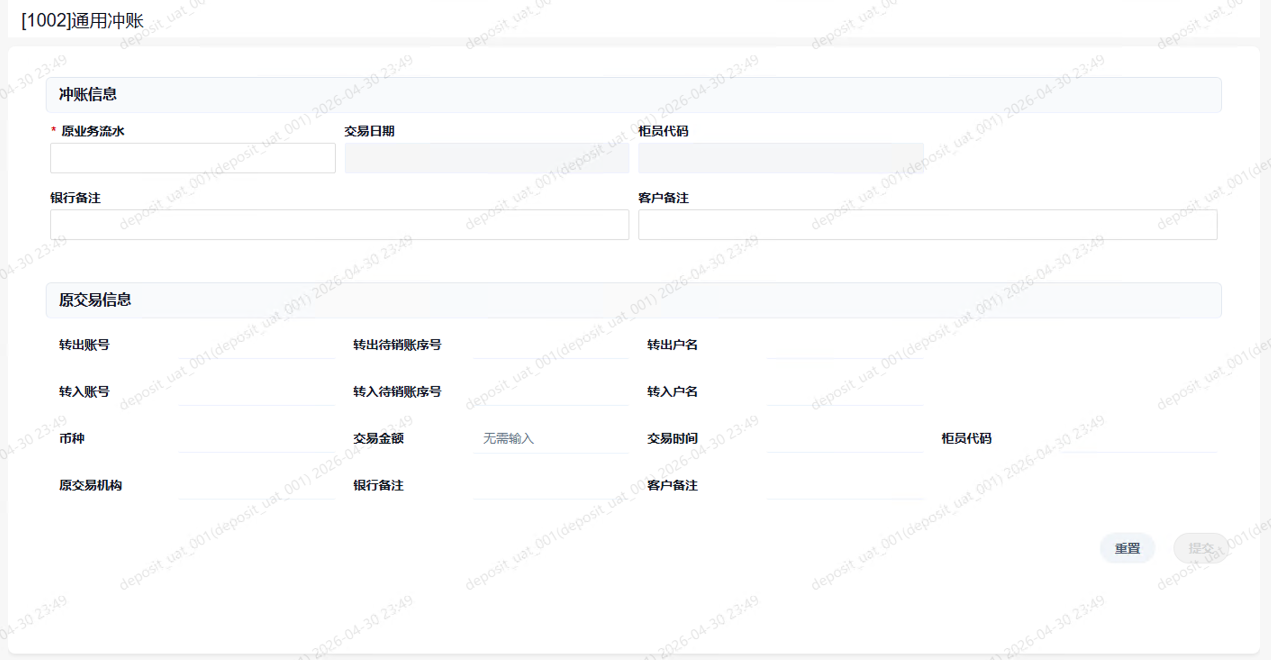
General Transaction Reversal retrieves an original transaction by its original business reference number and reverses it when business rules allow. It is not just a new opposite transfer. It is a controlled correction tied to the original transaction.
The page first captures the original business reference. The system then returns original transaction details such as transaction date, user code, source and destination accounts, account names, currency, amount, institution, time, and memos.
Page Elements
Reversal Information
| Field | Required | Description |
|---|---|---|
| Original business reference | Yes | Locates the transaction to reverse. |
| Transaction date | Display | Original transaction date returned by the system. |
| User code | Display | Operations user who processed the original transaction. |
| Bank memo | No | Internal explanation for this reversal. |
| Customer memo | No | Customer-facing or explainable note, depending on system rules. |
Original Transaction Information
| Field | Description |
|---|---|
| Source account | Debit/source account from the original transaction. |
| Destination account | Credit/destination account from the original transaction. |
| Currency | Original transaction currency. |
| Transaction amount | Original transaction amount. |
| Transaction time | Time of the original transaction. |
| Original institution | Institution where the original transaction was processed. |
| Original memos | Bank and customer memos from the original transaction. |
Business Flow
- The operations user opens
[1002] General Transaction Reversal. - The user enters the original business reference number.
- The system retrieves and displays the original transaction.
- The user verifies accounts, names, currency, amount, time, user, and institution.
- The user enters a reversal memo.
- The user submits the reversal.
- The system validates whether the original transaction exists, is eligible for reversal, has not already been reversed, and still satisfies account, permission, and approval rules.
- If validation passes, the system creates a reversal record and reverses the original accounting impact according to configured rules.
Core Reading
The original business reference is the key. Without it, the system cannot reliably identify the transaction, determine the reversal direction, or verify whether reversal is allowed.
A reversal is high risk because it changes the accounting result created by the original transaction. The purpose of displaying the original transaction is to make the user confirm exactly which transaction is being reversed.
The system should not delete the original transaction. The original and the reversal should both remain visible, forming a complete audit trail.
Risk Controls
| Risk | Control Point |
|---|---|
| Wrong original business reference | Verify all original transaction details before submission. |
| Poor reversal explanation | Use clear bank memos for audit and customer support. |
| Reversing a transaction already used by later processing | Check downstream impacts such as fees, interest, suspense items, or internal accounts. |
| Using reversal as a shortcut | Some errors require dedicated correction workflows or approvals. |
| Incomplete follow-up | Confirm the result through transaction history and user transaction records. |
Common English Usage
Use reverse a transaction, transaction reversal, and original business reference number.
Avoid chargeback here. In U.S. financial services, chargeback usually points to a card dispute workflow, not a generic core banking reversal.